Re-contract Process Redesign
Summary
I redesigned the work left after re-contract creation, when accounting manually transferred unbilled collection tasks and operations reconnected schedules. I defined the transfer scope by the reason for the change and planned processing around the actual contract transition and the completion of collections already in progress.
- Role
- Product Owner (planning lead, policy definition, UI and workflow design)
- Outcome
- Re-contract transfer policies, automated follow-up at contract transition and schedule completion
Problem
A new contract still left collection tasks and schedules to move
Changes to the price, business entity, disposal facility, or work location can require ending the existing contract and creating a re-contract. After CX listed the target contracts and registered the new ones, unbilled collection tasks and schedules still had to move. Accounting manually transferred unbilled collection tasks to the new contract, while operations updated schedules. If missing tasks surfaced at settlement, settlement and sales staff also had to help investigate.
Schedules already in progress were particularly difficult to transfer. Collections usually ran at night, so operations staff had to process transfers in the early morning or remember when a schedule ended and return to it. Missing that moment could leave schedules disconnected from the new contract and cause missed collections. Creating the contract still left work that someone had to remember and complete later.
This was my first planning assignment at Reco, and I led it from defining the improvement goals and KPIs. I led meetings with accounting, CX, and operations to identify when manual processing was needed and document each team’s requirements. From those discussions, I defined which collection tasks and schedules could transfer automatically and which exceptions needed separate review, then worked with designers and developers to specify the screens and workflow from contract creation through transfer and result checks.
Planning Decisions
Separating billing for completed work from future collection
Deciding which contract should bill completed work was different from deciding who would collect next and where. I defined separate transfer conditions for collection tasks and schedules based on what changed between contracts.
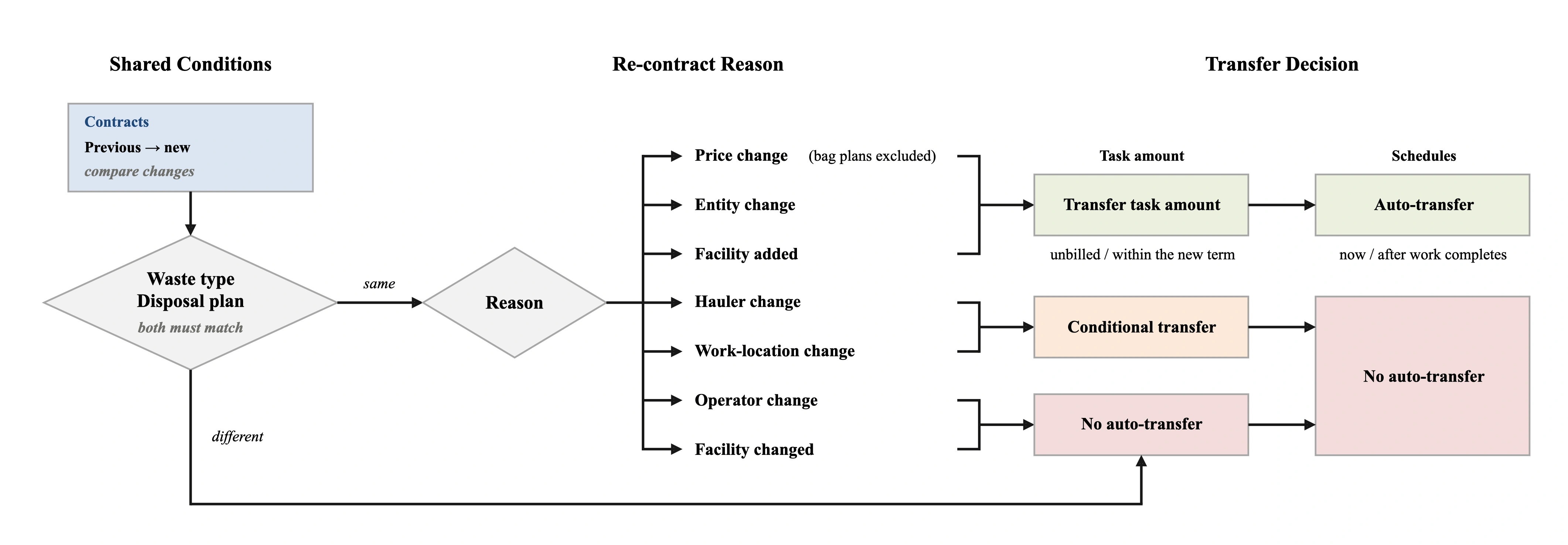
A change to the hauler or work location required checking whether the existing vehicle, driver, and route could continue, unlike a price-only change. I limited the planned transfer scope in these cases to collection tasks subject to additional checks. Schedule reassignment was excluded from automation because dispatch arrangements needed review. The two targets would not transfer together simply because both belonged to a re-contract.
I also distinguished adding a disposal facility from replacing one. Adding a facility while retaining the existing one preserves the disposal route recorded in earlier work; replacing it can remove the facility that actually handled the work from the new contract. I limited automatic transfers to cases retaining the existing waste-treatment providers and required checking that the facility recorded for the work was included in the new contract. Operator changes were also excluded because the operating conditions of the previous work could not be assured.
Shared conditions came before the rules for each reason. Changes to the waste type or Allbaro disposal plan were excluded from automatic transfer because the previous permit scope and handover information could not simply be reused. Waste-treatment permits cover particular waste types and activities, and Allbaro handover records must match the actual discharge, transport, and treatment relationships.
Permit-scope reference: Waste Control Act, Article 25 (Korean).
| Re-contract reason | Task-amount transfer | Schedule auto-reflect | Note |
|---|---|---|---|
| Price / plan change | ○ | ○ | Bag plan excluded |
| Business-entity change | ○ | ○ | - |
| Hauler change | △ | × | - |
| Operator change | × | × | - |
| Disposal facility added | ○ | ○ | - |
| Disposal facility changed | × | × | - |
| Work-location change | △ | × | - |
○ eligible for automation · △ review after checking conditions · × excluded
Collection Tasks and Billing
Reviewing unbilled work while preserving settlement records
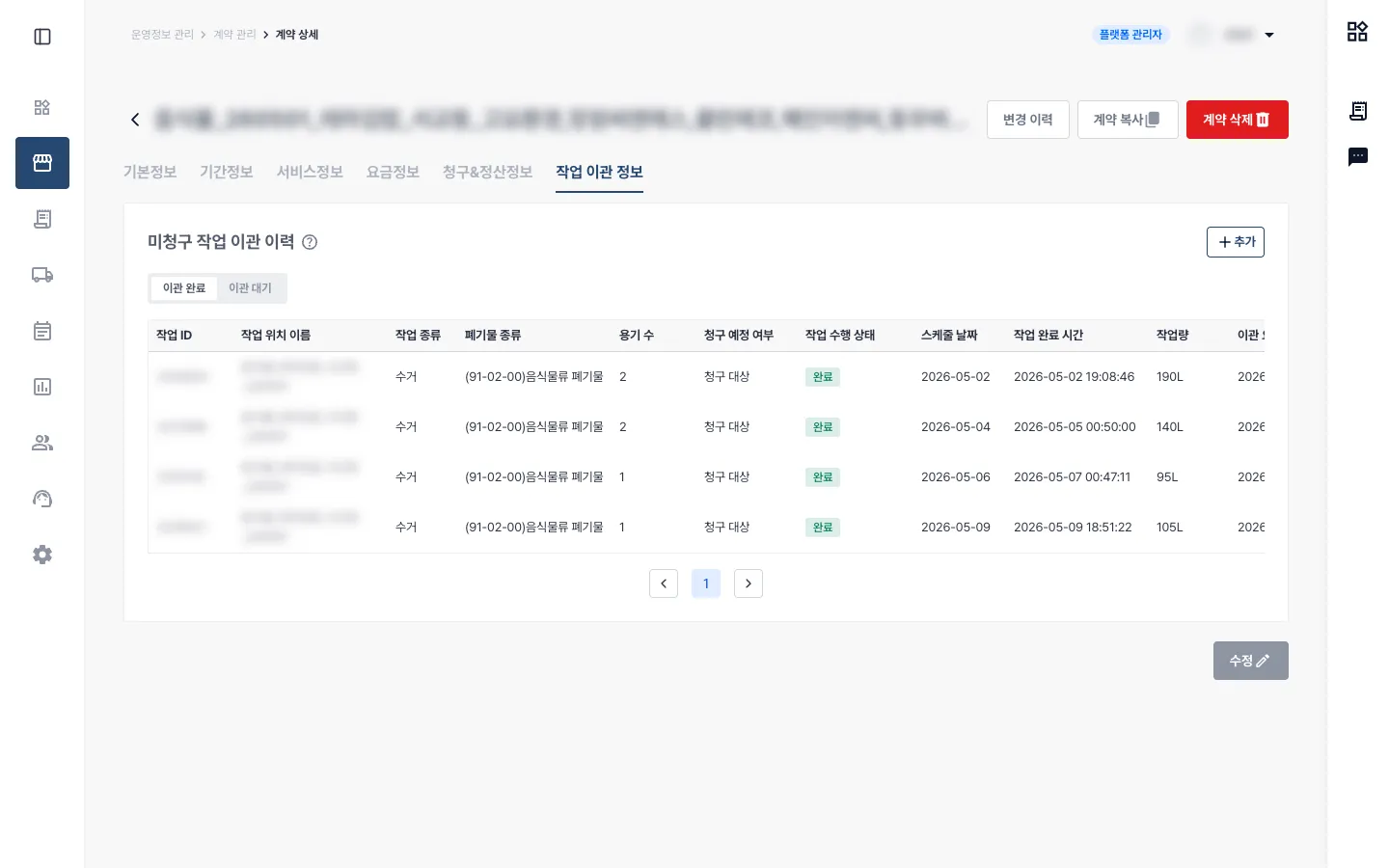
Meeting the contract-level conditions did not make every previous task eligible for transfer. Moving a task changes which contract bills it and which rates apply. I kept already-billed work with the previous contract and limited transfers to unbilled work within the new contract term.
Operators often transferred work from a particular period together, but customer billing agreements or the type of work could require exclusions. I used the new contract start date as the default filter while allowing operators to adjust the period, review waste type, work time, and task amount, and exclude individual tasks. I separated this review into a step after saving the contract to reduce the burden of reviewing exceptions while entering contract information.
I reviewed transitions between bag-rate plans and other pricing plans separately. Bag delivery and waste collection are different types of work with different billing rules, so previously completed tasks could not simply move to the new plan. This distinction also informed the automatic-transfer scope for price and plan changes.
To prevent missing discounts or surcharges from causing underbilling or overbilling, I specified that entries valid during the new contract term should carry over, including zero-value entries. The re-contract could not be deleted while transferred unbilled tasks or invoices with incomplete payment processing remained. These restrictions preserved the contract and billing conditions needed to finish settlement after a transfer.
Connecting Contract Transition and Collection
Choosing transfers in advance and processing them at the right time
Choosing a transfer and executing it were separate steps. A re-contract created in advance would transfer at the actual contract transition; schedules still in progress would finish collection before being linked automatically.

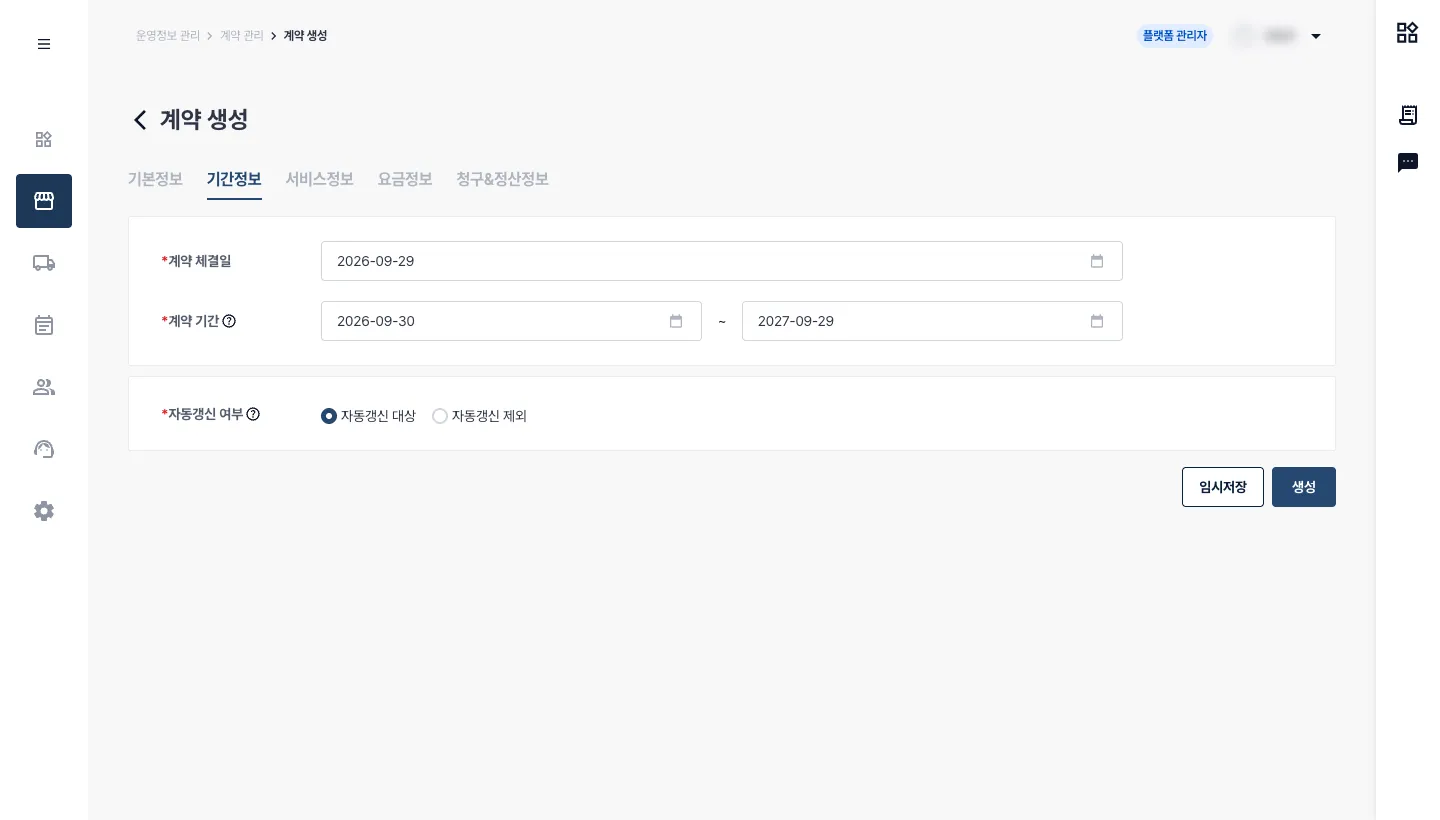
Some re-contracts needed neither collection-task transfers nor schedule changes, so I made the two choices independent. To reduce separate requests after contract creation, I placed the schedule-transfer choice in the creation process. Operators can select it directly below the contract period, review the affected schedules, and save the contract.
Selecting a transfer did not execute it immediately. For re-contracts created in advance, processing would begin when the contract actually transitioned on the new start date. Even when preparation and activation happened at different times, transfer timing followed the actual contract transition.
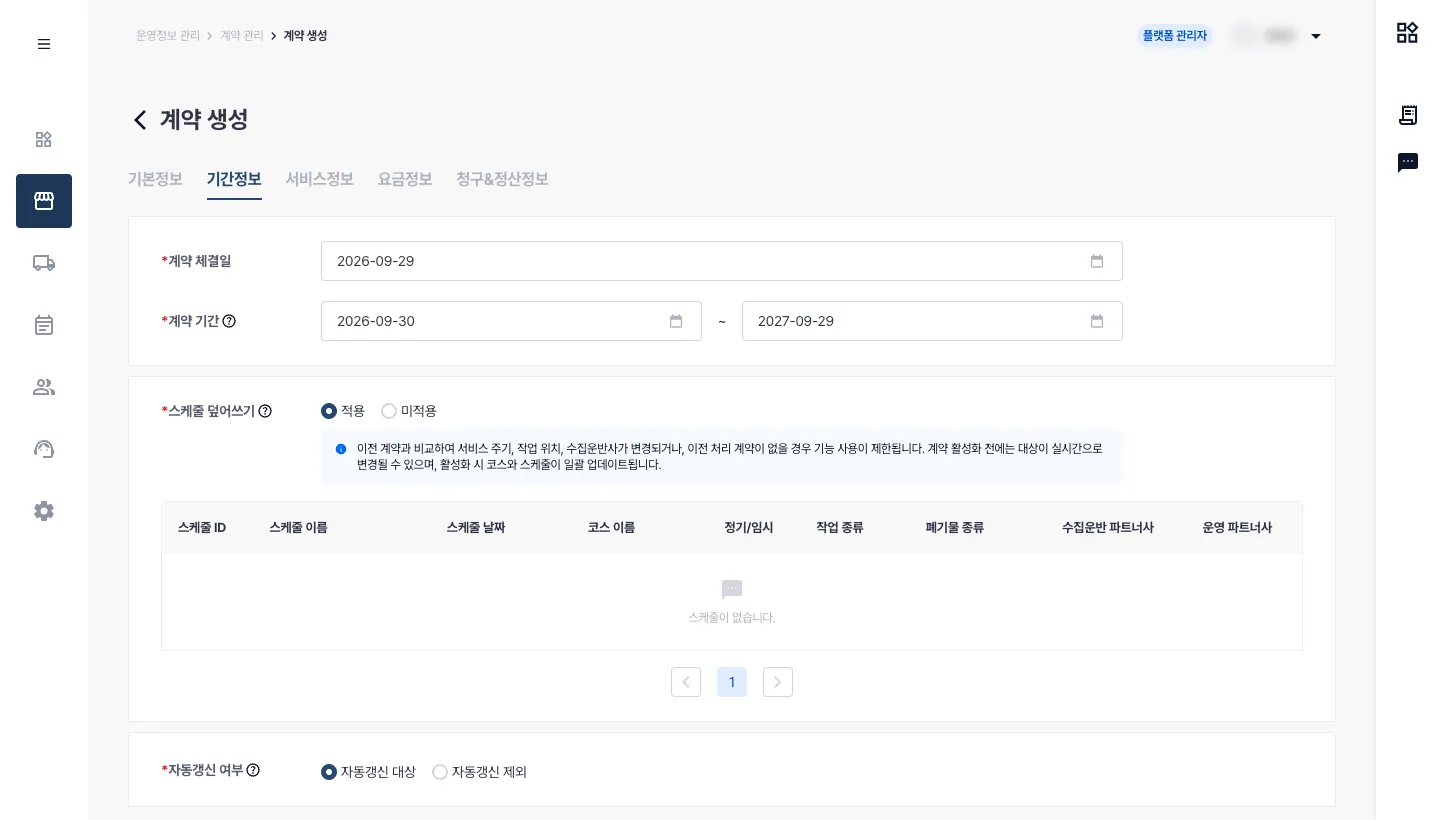
Drivers use the work location shown in a schedule to identify what to collect. Changing the contract link during collection could make work start under one contract and have its results recorded under another, so I also required checking the schedule state at contract transition. Schedules that had not started would transfer immediately; those in progress would enter a pending queue and transfer automatically after normal completion or force-closing. This included the follow-up that previously required operators to wait and request the transfer again.
I limited reassignment to regular and ad-hoc work continuing an existing dispatch. Completed work and schedules before the new contract start date stayed with the previous contract. One-off requests, which might not yet have been assigned, and separately managed add-on work were excluded. This scope separated the historical work to retain from the collections to continue after transition.
| Schedule state | Handling |
|---|---|
| Not started | Work location switched to the new contract immediately |
| In progress | Queued → transferred automatically when the schedule ends (normal or force-closed) |
Checking Processing Results
Showing pending and completed transfers and blocking ineligible changes
Because processing time depended on schedule state, operators needed to see whether a requested transfer was pending or complete. I specified transfer status and history in contract detail and separated permissions: admins could execute transfers, while partners could view the results.
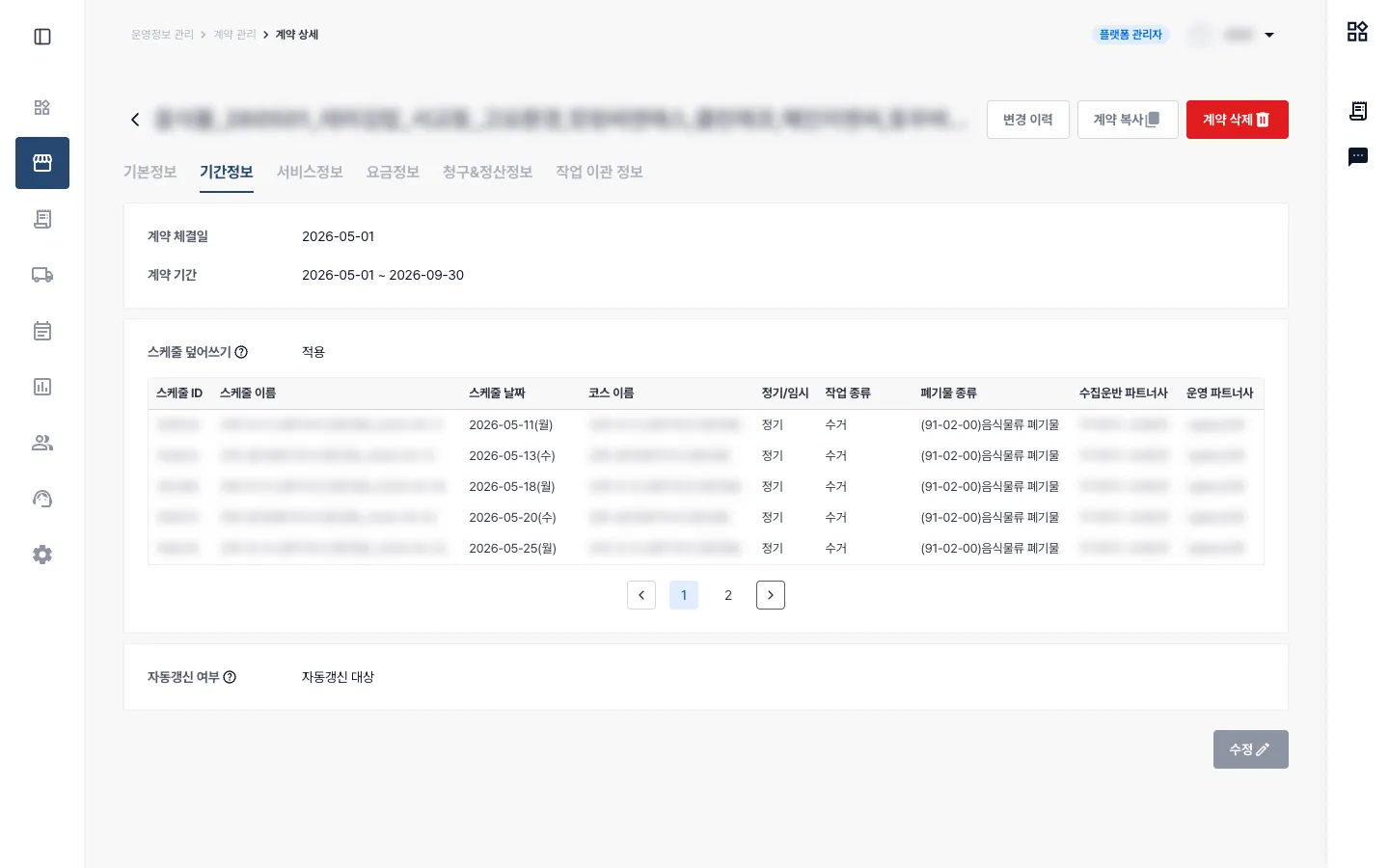
I also specified checks on combinations of hauler, operator, service cycle, pricing plan, and disposal facilities against the transfer conditions. Ineligible changes would display the reason and block saving, aiming to reduce cases where operators discovered only after creating a contract that its tasks or schedules could not transfer.
Results and Lessons
Reducing follow-up work by connecting the two contracts
After the re-contract redesign and bulk copy were introduced together, manual re-contract support requests, including schedule and Allbaro handling, fell from 80 to 27. The result combined fewer transfers and follow-up steps for individual contracts with bulk creation and transfer of multiple contracts.
I focused on reducing manual work while keeping billing and field collections aligned. Completed tasks still needed to be billed under the right contract and rates, while collections already in progress needed to finish even when the contract changed. That meant defining what could transfer automatically, which exceptions needed review, and when each transfer should take place.
My first planning assignment taught me that the same re-contract forms part of a different workflow for each team. Setting goals and KPIs and leading meetings across teams required considering their needs together and turning them into conditions and exceptions that developers could implement. I learned that making a plan concrete requires understanding the settlement and field work that follow the actions visible on screen.
| Metric | Before | After |
|---|---|---|
| Manual support after re-contract creation | 80 requests | 27 requests |