KUCODE
Summary
A development activity platform connecting academic records and GitHub activity at Korea University’s College of Informatics. I built it so the same development history could support course-level analysis for faculty and teaching assistants, as well as individual e-Profiles and portfolio material for students.
- Role
- Project Lead, PM (full-stack development, deployment environment setup)
- Stack
- Django, Vue.js, PostgreSQL, Docker Compose, Nginx, Gunicorn
- Outcome
- Academic records and GitHub activity integration, course analytics and personal e-Profiles, portfolio PDF export
Problem
Connecting GitHub History to Coursework and Individual Experience
Students’ code and collaboration histories remain on GitHub, but activity scattered across repositories does not readily show which projects belonged to which courses. Faculty and teaching assistants needed to review development activity by course, while students needed to organize their own contributions across classes and independent projects.
KUCODE began to serve both purposes. I organized requirements around linking academic records with GitHub activity and selecting the scope of each view for its users. As project lead and PM, I developed the plan and took on full-stack development and deployment environment setup.
Data Design
Defining How Students, Courses, and Projects Connect
Course-level activity required enrollment information alongside GitHub accounts and repositories. The same course can have different students and projects each time it is offered, so courses, enrollment records, and project repositories are managed separately and linked through their relationships.
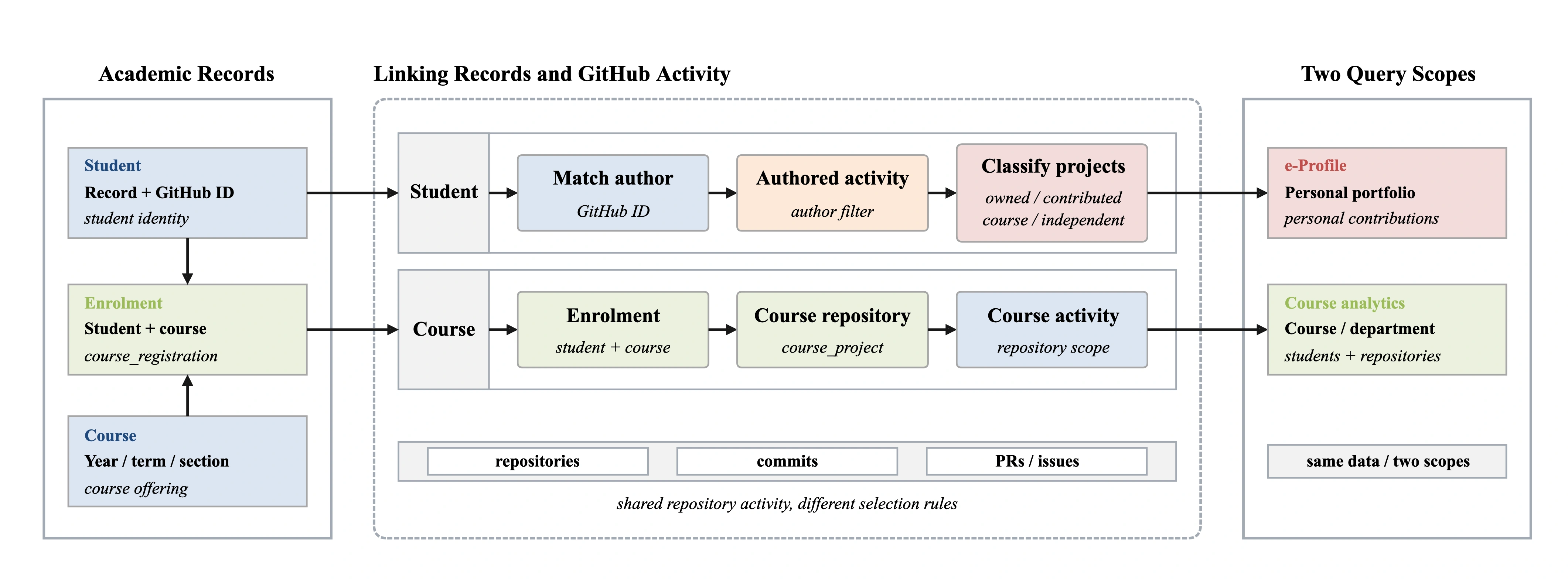
GitHub IDs link activity to students, while year, semester, and course code distinguish course offerings. Enrollment records connect students to courses; course projects connect courses to repositories. These relationships support both a student’s accumulated activity and a separate view of projects completed for a particular course.
Collection Design
Collecting Changed Repositories Without Overlooking Other Activity
The service links 9,095 repositories to student accounts. Recollecting every activity on each run would repeat API calls and updates for unchanged data. The current synchronization path compares GitHub update and push timestamps with their stored database values to select repositories for collection, reusing each owner’s repository listing within a run.
PRs and issues can appear or change state without a code push. Their changes are therefore checked separately even when repository metadata appears unchanged, so repositories with activity to update enter the collection list.
If the API check fails, the repository remains eligible for collection: an unconfirmed state is not treated as no change. A full collection path remains available when needed, and a uniqueness constraint on repository and SHA prevents duplicate commit records.
Use #1
Course-Level Activity at a Glance for Faculty and TAs
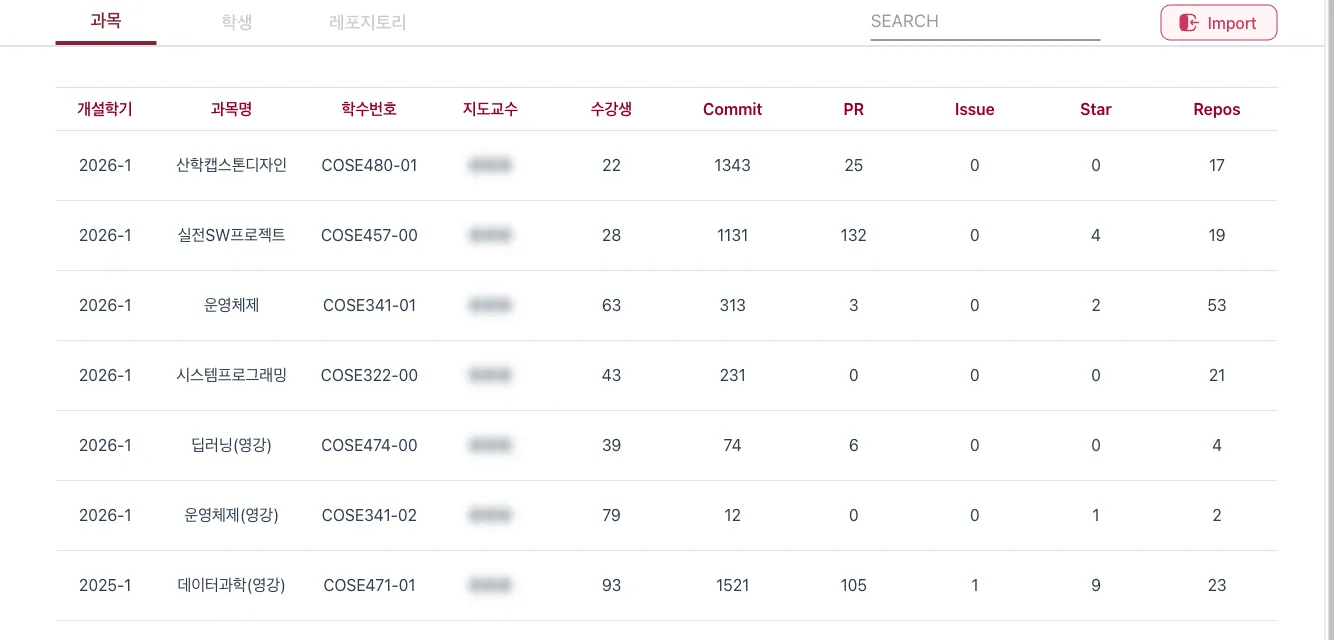
The course view brings together enrolled students, commits, PRs, issues, stars, and repository counts with academic information, so faculty and teaching assistants can review activity without opening repositories one by one. Users can change the analytical scope by course or department, while roster import, search, and statistics export support course administration.
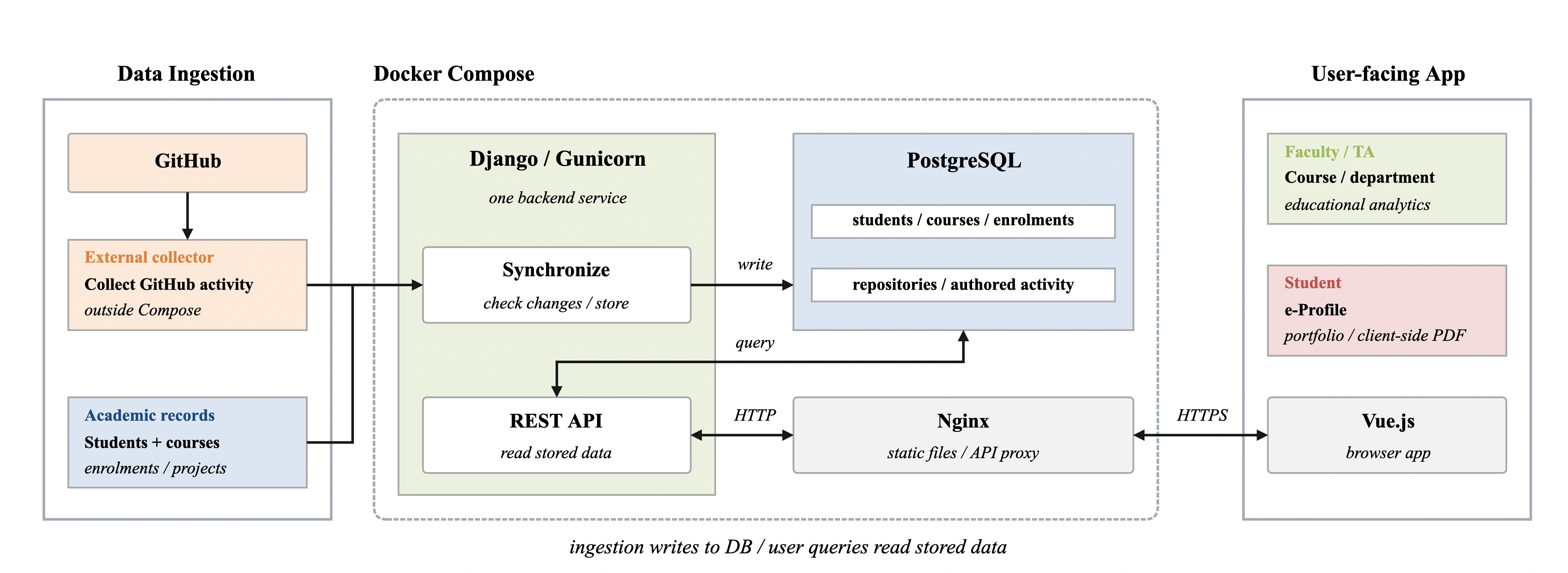
Collection and page queries are separate so opening a page does not require waiting for GitHub responses. Analytics APIs read stored activity from the database. Student–course analytics prefetches enrollment and course records and reuses repositories grouped by GitHub ID and projects grouped by repository ID to reduce repeated lookups.
Use #2
An e-Profile That Explains Each Student’s Own Contributions
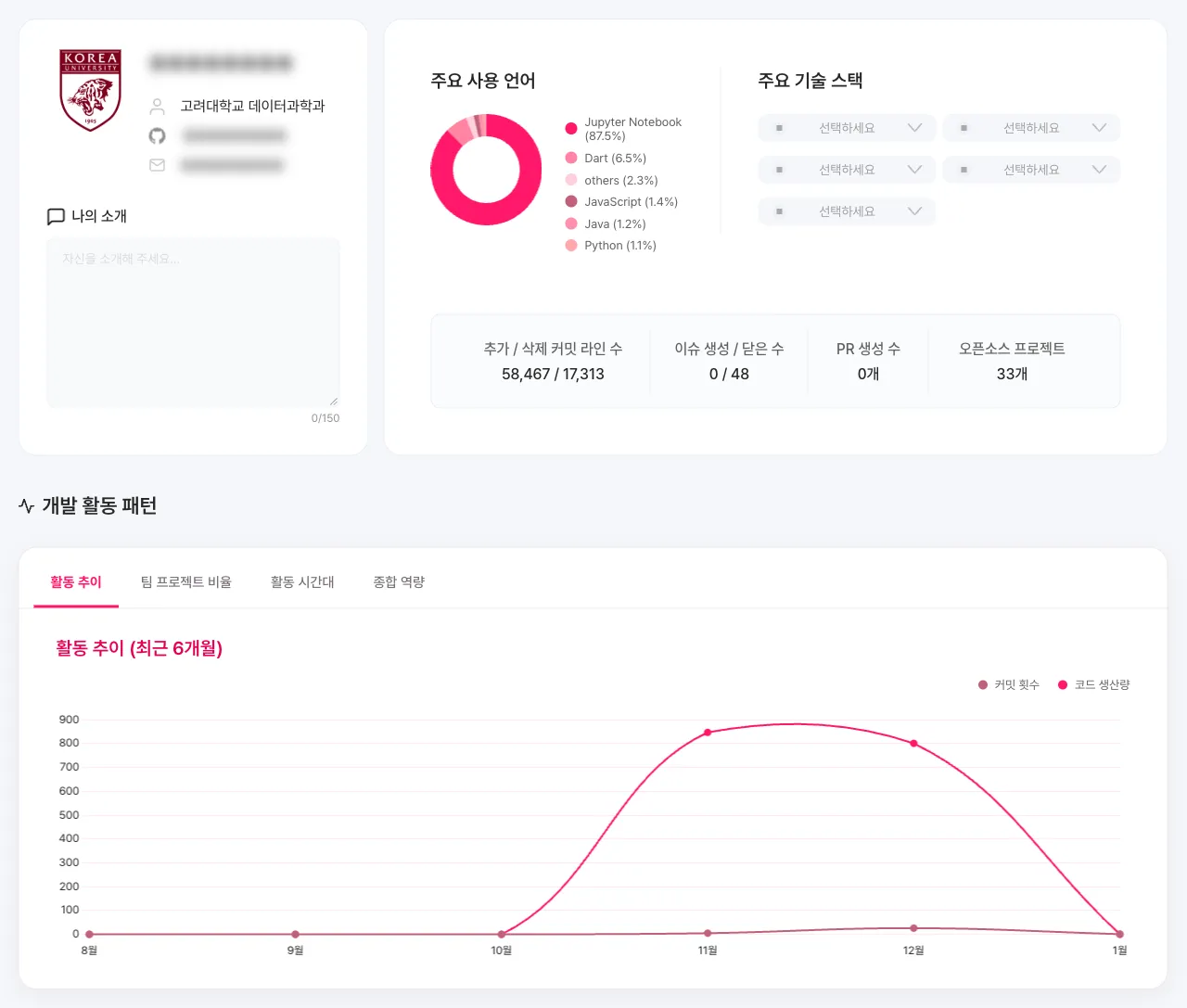
Showing an individual student’s experience required distinguishing their contributions from total activity in a team repository. Students can review their own commits, PRs, and issues by author and distinguish repositories they own from contributions to other repositories. The e-Profile brings together languages, activity trends, and project lists with an introduction and technology stack.
To turn that history into application material, students can choose course projects and independent work to include in a portfolio PDF. This lets them organize their development experience around the field they are applying to or the work they want to describe.
Delivery and Results
One Development History for Course Analytics and Personal Portfolios
The service uses Django and Vue.js with PostgreSQL, while Docker Compose runs Nginx and Gunicorn. Development, staging, and production use separate Compose projects and data volumes to keep development settings and data from being mixed with production.
The platform connects academic records with GitHub activity to provide course analytics, individual e-Profiles, and portfolio PDFs. Its accumulated data is linked to course offerings across 5 semesters.
| Measure | Count |
|---|---|
| Students in analytics | 1,018 |
| Linked repositories | 9,095 |
| Linked course offerings | 30 |
Alongside collecting activity, the central decision was whose activity to show and in what context. Separating the scope of course analysis from individual experience allowed the same data to support both educational analysis and students’ portfolios.